Projector Throw Distance: How to Calculate It in a Small Room
Get the Big Screen Without Discovering Your Projector Needs to Sit in the Hallway
Projector Throw Distance sounds like one of those technical terms you need to understand before you are allowed into the home-cinema club. Thankfully, it is much simpler than it sounds. In basic terms, it is the distance between your projector lens and the wall or screen where the picture appears.
That distance matters enormously in a small living room, bedroom or flat because you cannot simply keep moving the projector backwards until the image fits. There may be a sofa, bed, doorway or entire wall in the way. Understanding Projector Throw Distance before buying means you can work out how large an image your room can realistically handle, whether you need a standard, short-throw or ultra-short-throw projector, and exactly where the projector needs to live.
⚡ Quick Answer: Projector Throw Distance
Projector Throw Distance is the distance between the projector lens and the projection surface.
The core calculation is:
Throw Ratio = Throw Distance ÷ Image Width
So if you already know the image width you want:
Throw Distance = Image Width × Throw Ratio
For example, a 100-inch 16:9 picture is about 2.21 metres wide.
That means:
- 1.5:1 projector: around 3.32m away
- 0.8:1 projector: around 1.77m away
- 0.5:1 projector: around 1.11m away
- 0.25:1 projector: mathematically around 55cm away
That is why Projector Throw Distance is so important in a compact room. Two projectors can create the same 100-inch picture while needing completely different amounts of floor space.
📏 What Does Projector Throw Distance Actually Mean?
The easiest way to understand Projector Throw Distance is to imagine a projector sitting on a coffee table facing your wall.
Measure from the projector lens to the surface where the image appears.
That is your throw distance.
It does not normally mean:
- the distance from your sofa to the screen
- the distance from the back of the projector
- the total depth of your room
- the diagonal size of the picture
Those are separate measurements.
The important number for calculating Projector Throw Distance is the actual lens-to-screen distance.
This becomes particularly important in small rooms because even 30–50cm can completely change whether a projector fits comfortably.
A projector that needs 3.5 metres may work perfectly in a large lounge but be completely impractical in a 3-metre-deep bedroom.
🏠 Why Projector Throw Distance Matters More in a Small Room
If you have a huge room, projector placement is relatively forgiving. You can move the projector backwards, ceiling-mount it or use a rear shelf.
Small homes do not offer that luxury.
Your available Projector Throw Distance might be restricted by:
- a sofa
- a bed
- a doorway
- a radiator
- a coffee table
- a narrow walkway
- an awkward room shape
- limited wall space
For an even smaller alternative where wall and furniture space are particularly tight, our Best 40-Inch Smart TVs UK guide compares compact screens for flats and cosy living rooms.
And this is where people often make the wrong buying decision.
They compare resolution, brightness, speakers and streaming apps without first asking:
Can this projector physically create the image I want from the space I have?
For a compact UK home, Projector Throw Distance should be one of the first specifications you check.
A brilliant projector is not particularly brilliant if it needs to sit two feet behind your back wall.
🔢 Understanding Throw Ratio
Throw ratio is the number that controls Projector Throw Distance.
It describes how much distance the projector needs relative to the width of the image.
A projector with a 1.5:1 throw ratio needs approximately 1.5 metres of distance for every 1 metre of image width.
A projector with a 0.8:1 throw ratio needs around 0.8 metres.
A projector with a 0.5:1 throw ratio needs around 0.5 metres.
So as the throw-ratio number gets smaller, the required Projector Throw Distance gets shorter.
For a deeper explanation of the terminology, ProjectorCentral’s guide to projector throw distance and throw ratio explains how lens distance, image width and zoom affect projector placement.
Example
You want an image that is 2 metres wide.
With a 1.5:1 projector:
2 × 1.5 = 3 metres
With a 0.8:1 projector:
2 × 0.8 = 1.6 metres
With a 0.5:1 projector:
2 × 0.5 = 1 metre
Same image width.
Completely different room requirement.
💡 Small-space tip: Do not rely on the words short throw in an Amazon title. The actual throw ratio tells you far more.
⚠️ Do Not Use the Advertised Screen Size in the Formula
This is probably the easiest Projector Throw Distance mistake to make.
Projector image sizes are normally advertised diagonally.
You will see:
- 80-inch
- 100-inch
- 120-inch
- 150-inch
But throw ratio calculations use image width, not diagonal size.
A 100-inch screen is not 100 inches wide.
For a normal 16:9 picture, a 100-inch diagonal image is approximately:
- 2.21m wide
- 1.25m high
That 2.21m width is the number you use when calculating Projector Throw Distance.
Useful 16:9 Image Sizes
| Diagonal Size | Approx. Width | Approx. Height |
|---|---|---|
| 70 inches | 1.55m | 0.87m |
| 80 inches | 1.77m | 1.00m |
| 90 inches | 1.99m | 1.12m |
| 100 inches | 2.21m | 1.25m |
| 110 inches | 2.44m | 1.37m |
| 120 inches | 2.66m | 1.49m |
Keep this table handy when planning Projector Throw Distance because it saves constantly converting diagonal measurements.
🧮 How to Calculate Projector Throw Distance
Here is the easiest method.
Step 1: Decide How Large You Want the Picture
Suppose you want a 100-inch 16:9 image.
Its width is approximately 2.21 metres.
Step 2: Find the Projector’s Throw Ratio
Imagine the projector specification says:
0.8:1
Step 3: Multiply Image Width by Throw Ratio
2.21 × 0.8 = 1.768
Your required Projector Throw Distance is approximately:
1.77 metres
That is the basic calculation.
No special calculator required.
🎬 Projector Throw Distance for an 80-Inch Screen
An 80-inch 16:9 picture is approximately 1.77 metres wide.
Here is how Projector Throw Distance changes with different optics:
| Throw Ratio | Approx. Distance |
|---|---|
| 1.5:1 | 2.66m |
| 1.2:1 | 2.12m |
| 0.8:1 | 1.42m |
| 0.5:1 | 0.89m |
| 0.25:1 | 0.44m |
An 80-inch screen can therefore work surprisingly well in a modest bedroom.
A conventional projector may need more than 2 metres, while a short-throw model could potentially sit comfortably in front of the bed.
🍿 Projector Throw Distance for a 100-Inch Screen
A 100-inch screen is a popular target because it gives you a noticeably more cinematic picture without automatically taking over an entire wall.
Image width is approximately 2.21 metres.
| Throw Ratio | Approx. Distance |
|---|---|
| 1.5:1 | 3.32m |
| 1.2:1 | 2.65m |
| 0.8:1 | 1.77m |
| 0.5:1 | 1.11m |
| 0.25:1 | 0.55m |
This table shows why Projector Throw Distance can matter more than the headline screen size.
A standard projector could require more than three metres.
A genuine short-throw projector may need roughly half that.
For a small UK living room, that difference can decide whether projection is practical at all.
🎥 Projector Throw Distance for a 120-Inch Screen
A 120-inch image sounds fantastic, but this is where room dimensions really start to matter.
A 120-inch 16:9 picture is approximately 2.66 metres wide.
| Throw Ratio | Approx. Distance |
|---|---|
| 1.5:1 | 3.99m |
| 1.2:1 | 3.19m |
| 0.8:1 | 2.13m |
| 0.5:1 | 1.33m |
| 0.25:1 | 0.67m |
A standard projector can easily need close to four metres of Projector Throw Distance for this image size.
That is simply unrealistic in many bedrooms and compact living rooms.
A short-throw model changes the equation considerably.
But remember: just because your projector can create a 120-inch picture does not mean your room should have one.
Viewing comfort still matters.
🔄 Working Backwards From the Size of Your Room
Sometimes you already know your maximum Projector Throw Distance.
That actually makes the buying process easier.
Imagine your room gives you exactly 2 metres between the possible lens position and the wall.
Your projector has a 0.8:1 throw ratio.
Instead of calculating distance, divide:
2 ÷ 0.8 = 2.5 metres
Your theoretical image width is approximately 2.5 metres.
That corresponds to roughly a 113-inch 16:9 image.
This calculation is incredibly useful for small homes because it lets the room dictate the projector rather than trying to force the projector into the room.
💡 The Better Way to Shop for a Projector
If you already know your room dimensions, do this before looking at product reviews:
- Measure your usable wall.
- Decide on a realistic picture size.
- Convert the diagonal into image width.
- Measure your maximum available Projector Throw Distance.
- Work out the maximum throw ratio that will fit.
- Then start shopping.
For example:
You want a 100-inch image.
Width = 2.21m
Your projector can sit a maximum of 1.8m from the wall.
Calculate:
1.8 ÷ 2.21 = 0.81
You therefore need a projector with a throw ratio of around 0.81:1 or lower.
That immediately eliminates a huge number of unsuitable projectors.
📺 Standard Throw vs Short Throw vs Ultra-Short Throw
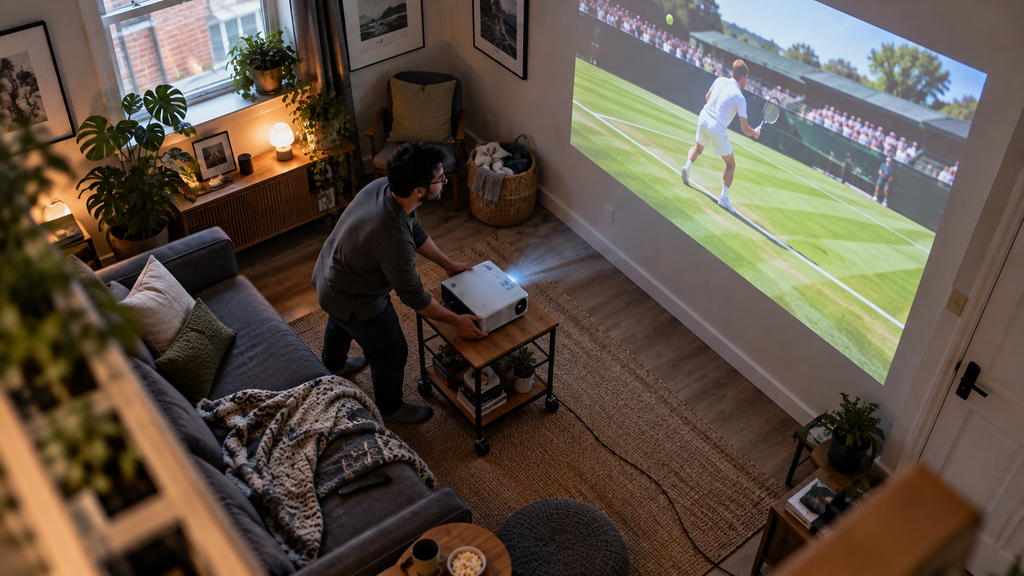
The three main projector categories behave very differently.
Standard Throw
A conventional projector generally needs the greatest Projector Throw Distance.
For larger pictures, it may need to sit:
- behind the sofa
- on a rear shelf
- high on a wall
- on the ceiling
There is nothing wrong with standard-throw projection if your room is deep enough.
But it can be awkward in smaller homes.
Short Throw
A short-throw projector creates the same image from much closer.
A model around 0.5:1 to 0.8:1, for example, can substantially reduce Projector Throw Distance compared with a conventional projector.
This can allow the projector to sit:
- on a coffee table
- between the sofa and wall
- on a small stand
- closer to the front of the room
Short throw can be a particularly practical compromise for compact living rooms.
Ultra-Short Throw
Ultra-short-throw projectors take this much further.
These typically sit on a cabinet directly below or near the projection wall and use specialised optics to throw the image sharply upwards.
The Projector Throw Distance can be extremely short.
However, UST placement is also sensitive.
A tiny movement forward, backwards or sideways can make a surprisingly large difference to the image.
Always follow the manufacturer’s installation measurements for an ultra-short-throw model rather than relying entirely on a generic calculation.
🛏 Projector Throw Distance in a Small Bedroom
Bedrooms are one of the most useful places to understand Projector Throw Distance.
Beds consume a huge amount of floor space.
Wardrobes reduce usable wall area.
And unlike a living room, there may be nowhere behind you to position a conventional projector.
Suppose your projector can sit on a small table at the foot of the bed, 1.5 metres from the wall.
With a 0.8:1 throw ratio:
1.5 ÷ 0.8 = 1.875 metres wide
That gives you roughly an 85-inch diagonal image.
For a bedroom, that is already huge.
You do not necessarily need 120 inches for projection to feel dramatically larger than a television.
💡 Small-space tip: An 80–90-inch image in a bedroom can feel much bigger than the same size in a large living room because you are sitting closer.
🛋 Projector Throw Distance in a Small Living Room
Living rooms are usually more flexible, but furniture creates its own problems.
Imagine your wall is 2.4 metres wide and there is approximately 2.2 metres of usable room between the wall and the front of your sofa.
With a standard 1.5:1 projector, 2.2 metres of Projector Throw Distance gives:
2.2 ÷ 1.5 = 1.47 metres wide
That is roughly a 66-inch image.
Now use a 0.8:1 projector:
2.2 ÷ 0.8 = 2.75 metres wide
That exceeds your 2.4-metre wall.
The room rather than the projector now becomes the limiting factor.
That is a good problem to have.
It means you can move the projector closer or choose a smaller image rather than discovering the projector cannot go large enough.
📐 What If Your Projector Has a Throw-Ratio Range?
Some projectors do not have one fixed ratio.
Instead, you might see:
1.15–1.50:1
This normally means the projector has optical zoom.
That gives you a range of possible Projector Throw Distance positions for the same image size.
Suppose your image is 2 metres wide.
At 1.15:1:
2 × 1.15 = 2.3 metres
At 1.50:1:
2 × 1.50 = 3 metres
So that projector could potentially produce the required picture from somewhere between approximately 2.3 and 3 metres away.
That flexibility can be incredibly useful when fitting a projector around existing furniture.
🔍 Optical Zoom vs Digital Zoom
This distinction matters.
Optical zoom changes the image using the projector’s lens system.
That gives you genuine flexibility when adjusting Projector Throw Distance.
Digital zoom electronically shrinks or alters the projected picture.
It can be useful occasionally, but it is not the same thing.
If your projector only fits the room by heavily shrinking the picture digitally, you have probably chosen the wrong optical setup.
Where possible, get Projector Throw Distance right physically first.
Then use minor digital adjustments only for finishing touches.
📏 Where Exactly Should You Measure From?
Generally, Projector Throw Distance is measured from the projector’s lens to the projection surface.
This distinction is easy to overlook.
Imagine the projector itself is 35cm deep.
If the lens is at the front of the chassis, the back of the projector could sit 35cm further into the room than your calculated lens position.
In a large room that barely matters.
In a small bedroom, it can mean your projector is suddenly hanging halfway over the edge of a table.
Always consider:
- lens position
- chassis depth
- power cable clearance
- HDMI cable clearance
- ventilation space
The maths tells you where the lens should be.
You still need enough room for the rest of the projector.
🌬 Don’t Forget Ventilation
A projector is not a decorative box.
It generates heat.
When planning Projector Throw Distance, leave enough space around the projector for its cooling system to operate properly.
Avoid pushing it tightly against:
- books
- curtains
- walls
- cushions
- piles of clothes
- enclosed shelves
The exact clearance varies between models, so check the manufacturer’s guidance.
This matters particularly in bedrooms where projectors often end up squeezed onto small shelves or bedside furniture.
🚶 Think About Where People Walk
The maths might say your Projector Throw Distance is perfect.
Real life may disagree.
Imagine positioning a conventional projector behind the sofa with its beam travelling across the entire room.
Every time someone walks to the kitchen:
giant silhouette across the film.
Short-throw projectors can reduce this problem because there is less open space between projector and screen.
Think about:
- doors
- walkways
- children moving around
- pets
- the route to the kitchen
- whether someone will regularly stand directly in the beam
A technically correct Projector Throw Distance should also work with how the room is actually used.
🪑 Coffee Table, Shelf or Ceiling?
The right placement depends partly on your Projector Throw Distance.
Coffee Table
A coffee-table setup is flexible and excellent while experimenting.
You can easily slide the projector forwards and backwards until you find the image size you like.
The downside is obvious: the projector occupies the coffee table.
Rear Shelf
A rear shelf works well if your required Projector Throw Distance happens to align with the back wall.
It can create a very tidy setup.
However, check:
- ventilation
- image height
- lens offset
- whether the shelf is deep enough
Ceiling Mount
Ceiling mounting removes the projector from your furniture entirely.
But calculate the position carefully before drilling.
It is much easier to move a projector 20cm on a coffee table than relocate four ceiling bolts.
Low Media Cabinet
This is the usual home for an ultra-short-throw projector.
Because UST positioning is so sensitive, use stable furniture.
A cabinet that shifts every time someone bumps into it can turn image alignment into a recurring hobby you never asked for.
📺 Projector Throw Distance vs Viewing Distance
These two measurements are often confused.
Projector Throw Distance = projector to screen.
Viewing distance = your eyes to screen.
They can be completely different.
You might have:
- projector 1.2m from wall
- sofa 2.5m from wall
That is perfectly normal.
Do not automatically choose the largest image that your Projector Throw Distance allows.
A 120-inch picture viewed from very close can feel overwhelming.
Sometimes 90–100 inches produces a much more enjoyable experience.
If a projector feels excessive for your available viewing distance, our Best 43-Inch 4K TVs UK guide covers compact 4K alternatives for smaller living rooms.
🖼 Does the Wall Matter?
Absolutely.
Your Projector Throw Distance may mathematically allow a 120-inch image, but your wall still needs enough clear space.
Look for:
- radiators
- light switches
- sockets
- shelving
- picture rails
- doors
- sloping ceilings
- uneven plaster
- furniture
A 2.7-metre-wide theoretical image is not useful if only 2 metres of clean wall exists.
Measure the wall before choosing your final screen size.
🎨 Do You Need a Projector Screen?
Not necessarily.
A smooth, light-coloured wall can work surprisingly well, particularly for casual evening viewing.
A proper screen can improve consistency, but it does not alter the basic Projector Throw Distance maths.
If your projector requires 1.8 metres to create a particular image width, changing from a painted wall to a screen does not suddenly change the lens ratio.
Ultra-short-throw projectors are more sensitive to surface imperfections because of the steep angle at which light hits the wall.
That is where a suitable screen can become considerably more valuable.
If daytime viewing is a priority, our OLED vs QLED TVs guide explores how different display technologies cope with brighter living rooms.
↕️ Does Ceiling Mounting Change Projector Throw Distance?
No — not in the way people sometimes expect.
Moving the projector vertically does not fundamentally change Projector Throw Distance.
The lens still needs to sit within the correct distance range for your chosen image width.
What ceiling mounting changes is:
- projector height
- vertical offset
- possible lens shift
- mounting geometry
So you need to consider both distance and image position.
🔀 What Is Lens Shift?
Lens shift allows you to move the projected image vertically or horizontally using the projector’s optics.
This can make placement much easier.
However, lens shift does not magically rewrite Projector Throw Distance.
You still need the correct distance for the required image width.
Lens shift simply gives you more freedom over where the picture lands.
That can be extremely useful in rooms where the projector cannot sit perfectly centred.
🔺 What About Keystone Correction?
Keystone correction fixes the trapezoid-shaped image you get when the projector is positioned at an angle.
Modern projectors can make this impressively automatic.
But keystone is not a substitute for good positioning.
Heavy digital correction may:
- reduce usable resolution
- shrink the active image
- soften fine detail
- create more processing
Get Projector Throw Distance and physical alignment as close as possible first.
Use keystone for correction rather than rescue.
If your projector needs better sound without filling the room with extra equipment, our Best Compact Soundbars UK guide compares space-saving all-in-one audio options.
📦 What If Your Projector Cannot Fit the Calculated Distance?
You have several options.
Choose a Smaller Image
This is often the easiest solution.
Reducing image width also reduces the required Projector Throw Distance.
Choose a Shorter Throw Ratio
Moving from 1.5:1 to 0.8:1 can dramatically reduce the space needed.
If your room needs a projector that can create a large image from much closer to the wall, see our Best Short Throw Projectors UK guide for models specifically suited to smaller spaces.
Use Optical Zoom
If your projector offers optical zoom, it may allow the image to fit without physically moving the projector as far.
Change the Projection Wall
Sometimes the best solution is simply turning the room around.
A different wall may give you a much more practical Projector Throw Distance.
Consider Short Throw or Ultra-Short Throw
If room depth is genuinely the limiting factor, this is exactly the problem those projector types are designed to solve.
🤏 Bigger Is Not Always Better
Projectors make it very tempting to chase ridiculous screen sizes.
If 100 inches is good, surely 150 inches is better?
Not necessarily.
A smaller image can offer:
- better perceived brightness
- more comfortable viewing
- easier placement
- cleaner-looking lower-resolution content
- room for speakers
- less wall domination
- easier focus
Your available Projector Throw Distance may allow a huge image, but that does not mean you have to use all of it.
In a small room, an 80–100-inch picture can already feel enormous.
For rooms where a conventional screen may be more practical than a huge projected image, our Best 50-Inch TVs UK guide compares larger televisions designed around compact living spaces.
⚠️ Common Projector Throw Distance Mistakes
1. Using Screen Diagonal Instead of Width
Throw ratio calculations use image width.
Not the advertised diagonal.
This is the most common Projector Throw Distance calculation error.
2. Measuring From the Back of the Projector
Normally measure from the lens unless the manufacturer’s installation instructions specify otherwise.
3. Believing Every “Short Throw” Listing
Always check the actual throw ratio.
Retailer titles can be surprisingly creative.
4. Forgetting the Projector’s Physical Depth
The lens may fit perfectly while the projector body sticks halfway into your walking route.
5. Ignoring Furniture
A perfect mathematical Projector Throw Distance is useless if the projector needs to occupy the same space as your sofa.
6. Assuming Keystone Fixes Everything
It does not.
Get the physical position right first.
7. Buying the Screen Before Doing the Maths
A huge screen can lock you into a Projector Throw Distance your room cannot provide.
8. Assuming Maximum Screen Size Is the Best Screen Size
Comfort matters more than bragging rights.
If you are unsure how much resolution matters as screen size increases, our HD Ready vs Full HD vs 4K guide explains how resolution and viewing distance affect visible detail.
✅ Projector Throw Distance Checklist
Before buying anything, check:
✔ Your usable wall width
✔ Your preferred diagonal image size
✔ The actual image width
✔ Your maximum available Projector Throw Distance
✔ The projector’s genuine throw ratio
✔ Any optical zoom range
✔ Minimum focus distance
✔ Lens position on the chassis
✔ Projector body depth
✔ Ventilation clearance
✔ Where cables will run
✔ Whether people will cross the beam
✔ Your viewing distance
✔ Manufacturer installation guidance
If all of those work together, you are far less likely to discover an unpleasant surprise after the projector arrives.
❓ FAQs
What Is Projector Throw Distance?
Projector Throw Distance is the distance between the projector lens and the wall or screen where the image appears.
It works together with the projector’s throw ratio to determine picture size.
How Do I Calculate Projector Throw Distance?
Multiply the required image width by the projector’s throw ratio.
For example:
2m image width × 0.8 throw ratio = 1.6m
The required Projector Throw Distance is approximately 1.6 metres.
What Projector Throw Distance Do I Need for a 100-Inch Screen?
A 100-inch 16:9 image is approximately 2.21 metres wide.
Approximate Projector Throw Distance would therefore be:
- 1.5:1 = 3.32m
- 1.2:1 = 2.65m
- 0.8:1 = 1.77m
- 0.5:1 = 1.11m
What Projector Throw Distance Do I Need for a 120-Inch Screen?
A 120-inch 16:9 image is approximately 2.66 metres wide.
At a 0.8:1 throw ratio, Projector Throw Distance would be around 2.13 metres.
At 0.5:1 it falls to approximately 1.33 metres.
Does Moving a Projector Further Away Make the Picture Bigger?
With a fixed lens, generally yes.
Increasing Projector Throw Distance normally increases image size.
Optical zoom can give you more flexibility depending on the projector.
Can Projector Throw Distance Be Too Short?
Yes.
Every projector has an operating range.
Positioning the projector closer than its supported Projector Throw Distance may leave you unable to focus correctly or achieve your desired image size.
Is Short Throw Better for a Small Room?
Often, but not automatically.
A shorter Projector Throw Distance makes placement easier when room depth is limited.
However, if a conventional projector already fits your room comfortably, there may be no reason to pay extra purely for short-throw optics.
Is Ultra-Short Throw Better Than Short Throw?
They solve slightly different problems.
Ultra-short throw can almost eliminate the open beam across your room.
Short throw generally gives you more flexibility than a standard projector while remaining closer to a conventional projector design.
Your ideal Projector Throw Distance and furniture layout should determine which makes more sense.
Can I Calculate Projector Throw Distance Before Buying?
Absolutely — and you should.
Measure the room, decide your preferred image width and calculate the throw ratio your space requires.
That allows you to eliminate unsuitable projectors before spending any money.
Do I Need a Special Calculator?
No.
For a basic fixed-ratio projector, Projector Throw Distance is simple enough to calculate manually.
A model-specific calculator becomes useful when the projector has optical zoom, lens-shift limits or more complicated installation requirements.
✅ Final Verdict
Projector Throw Distance is one of the most important projector specifications to understand in a small home — and thankfully, one of the easiest once you know the formula.
Start with the actual width of the image you want.
Then multiply that width by the projector’s throw ratio.
For a 100-inch 16:9 picture, which is approximately 2.21 metres wide:
- a 1.5:1 projector needs about 3.32 metres
- a 0.8:1 projector needs about 1.77 metres
- a 0.5:1 projector needs about 1.11 metres
That is an enormous difference in a compact living room or bedroom.
The biggest lesson is to let your room guide the purchase.
Measure the wall. Measure the available Projector Throw Distance. Think about where your sofa, bed, doors and walkways sit. Then choose a projector with optics that naturally work within those limits.
Do that before getting distracted by 4K labels, smart apps or enormous claimed screen sizes.
A projector with the right Projector Throw Distance will feel like it belongs in the room.
One with the wrong throw distance will have you rearranging the entire room around the projector — which is exactly the opposite of what Small Living Solutions is about.